Introduction: moving from using MCP servers to building one
Even if you have configured an MCP server and used its tools, the machinery behind that interaction can remain opaque. How does an AI client discover a tool, assemble its arguments, and handle invalid input or an execution failure?
In this tutorial, we will use FastMCP from the official Python MCP SDK to expose exactly one tool: create_task. This is still a small server, but it goes beyond Hello World by including every part of a realistic tool call:
- An input schema generated from type hints
- Schema-based input validation
- Business-rule validation inside the tool
- Persistence to a JSON file
- Structured output backed by a Pydantic model
- Execution errors represented with
ToolError - An AI client connection over stdio
This article uses mcp.server.fastmcp.FastMCP from the official mcp package. It does not use the separate package named fastmcp.
What we are building
The server exposes only create_task. It accepts a title, description, and priority. The server adds a UUID, an initial status, and a creation timestamp.
Field | Type | Required | Constraint |
|---|---|---|---|
| string | Yes | 1–100 characters; whitespace-only values are rejected |
| string / null | No | Up to 500 characters |
| string | No |
|
A stored task looks like this:
{
  "id": "b4ac86da-2ca3-4a01-bf4a-ae85a37bc820",
  "title": "Write the MCP article",
  "description": "Implementation article using the official Python SDK",
  "priority": "high",
  "status": "todo",
  "created_at": "2026-07-13T21:30:00+09:00"
}
The boundaries between the natural-language request and the file write are important:
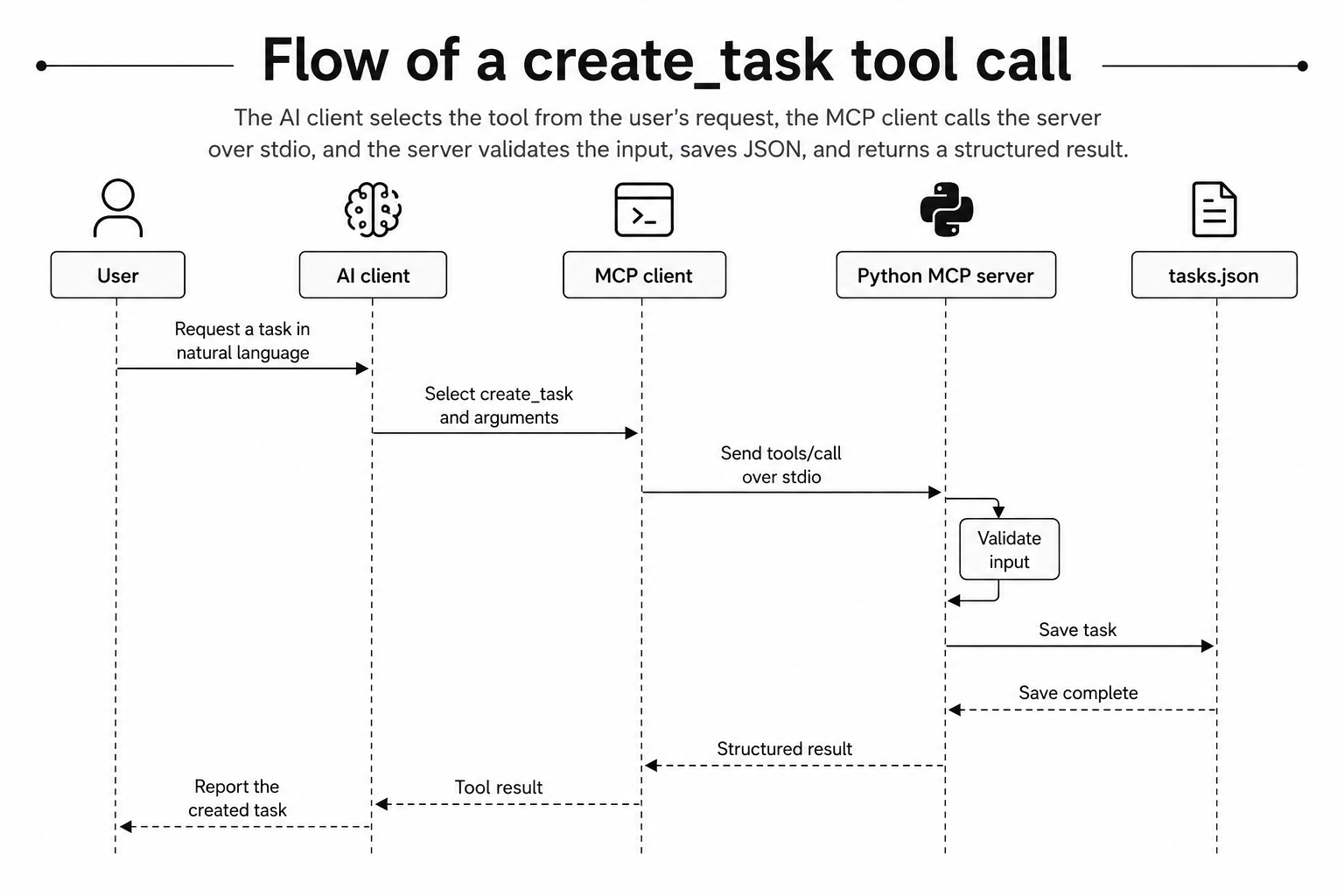
MCP tool call flow
The model is not calling a Python function directly. The MCP client obtains definitions through tools/list and asks the server to execute one through tools/call. The MCP specification defines tool metadata such as the name, description, and inputSchema.
Development environment and SDK version
This tutorial targets the following environment:
Python: 3.13
MCP Python SDK: 1.28.1
Package manager: uv
Transport: stdio
Storage: local JSON file
As of July 13, 2026, v1.x is the stable line and 1.28.1 is its latest release. The PyPI release page lists Python 3.10 or later as a requirement. Version 2 remains a prerelease, with the official repository targeting July 27, 2026 for its stable release.
For reproducibility, pin the exact dependency used by the article:
uv add "mcp[cli]==1.28.1"For a longer-lived library that should receive compatible patch updates, mcp>=1.28,<2 may be a better policy. A tutorial repository benefits from an exact pin because the article, lockfile, and completed code then run against the same SDK behavior.
Creating the project with uv
Initialize the project and pin both Python and the SDK:
uv init minimal-mcp-task-server
cd minimal-mcp-task-server
uv python pin 3.13
uv add "mcp[cli]==1.28.1"
The cli extra installs development commands used for workflows such as MCP Inspector integration. The official v1.x README likewise documents installation with uv add "mcp[cli]".
The finished repository only needs a small structure:
minimal-mcp-task-server/
├── server.py
├── data/
│   └── .gitkeep
├── tests/
│   └── test_server.py
├── .python-version
├── pyproject.toml
└── uv.lock
To keep the complete request path visible, this tutorial places the model, persistence functions, tool, and entry point in server.py.
Initializing the server with FastMCP
The server begins with two lines:
from mcp.server.fastmcp import FastMCP

mcp = FastMCP("task-manager")
task-manager is the server name, not the name of a Python variable. FastMCP handles tool discovery, argument parsing, schema generation from Python types, function execution, and conversion of results into MCP messages.
The official server-building guide also explains that FastMCP derives tool definitions from type hints and docstrings. At this point, we have a server container but no exposed tools.
A minimal create_task tool
Adding @mcp.tool() to a regular Python function registers it as a tool that MCP clients can discover and invoke.
from typing import Literal
from uuid import uuid4

@mcp.tool()
def create_task(
    title: str,
    description: str | None = None,
    priority: Literal["low", "medium", "high"] = "medium",
) -> dict[str, str | None]:
    """Create a new task and add it to the local task list.

    Args:
        title: Short title of the task.
        description: Optional details about the task.
        priority: Priority of the task.
    """
    return {
        "id": str(uuid4()),
        "title": title,
        "description": description,
        "priority": priority,
        "status": "todo",
    }
The function name and docstring are not merely developer comments. They help the model decide when the tool is appropriate. create_task communicates intent more clearly than execute or do_something, while “add a new task to the local task list” is more useful than Create something.
Names and descriptions are not security controls, however. Because this tool modifies a file, the client should show the proposed invocation and request user approval where appropriate.
Input schema and validation
FastMCP generates an inputSchema from the function signature. For example, this annotation conceptually becomes a JSON Schema enum with a default:
priority: Literal["low", "medium", "high"] = "medium"{
"type": "string",
"enum": ["low", "medium", "high"],
"default": "medium"
}We can add lengths and descriptions with Annotated and Pydantic's Field:
from typing import Annotated, Literal

from pydantic import Field

TaskTitle = Annotated[
    str,
    Field(
        min_length=1,
        max_length=100,
        description="Short title of the task",
    ),
]

TaskDescription = Annotated[
    str,
    Field(
        max_length=500,
        description="Optional details about the task",
    ),
]
Update the tool signature to use these aliases:
@mcp.tool()
def create_task(
    title: TaskTitle,
    description: TaskDescription | None = None,
    priority: Literal["low", "medium", "high"] = "medium",
):
    ...
Not every validation rule belongs in the schema:
Validation category | Example | Implementation |
|---|---|---|
Structure | Is | Type hint |
Single-field constraint | Is the title at most 100 characters? |
|
Closed choice | Is priority one of three values? |
|
Business rule | Is the title more than whitespace? | Tool body |
External failure | Can the JSON file be written? | Exception handling |
min_length=1 rejects an empty string, but " " has three characters and passes that rule. The tool therefore calls strip() and validates the normalized value. The schema helps the model construct good arguments, but it does not make input trustworthy; server-side validation remains mandatory.
Saving tasks to a JSON file
We will save results in data/tasks.json. This requires slightly more code than an in-memory list, but it keeps tasks visible after the server exits and makes the tool's side effect concrete.
import json
from pathlib import Path
from typing import Any

DATA_FILE = Path(__file__).parent / "data" / "tasks.json"


def load_tasks() -> list[dict[str, Any]]:
    if not DATA_FILE.exists():
        return []

    with DATA_FILE.open(encoding="utf-8") as file:
        data = json.load(file)

    if not isinstance(data, list):
        raise ValueError("Task data must be a JSON array.")

    return data


def save_tasks(tasks: list[dict[str, Any]]) -> None:
    DATA_FILE.parent.mkdir(parents=True, exist_ok=True)
    with DATA_FILE.open("w", encoding="utf-8") as file:
        json.dump(tasks, file, ensure_ascii=False, indent=2)
Deriving the path from __file__ instead of the current working directory keeps the storage location stable when an AI client launches the server from somewhere else.
This JSON store is intentionally educational. It does not address concurrent writers, a crash during a write, or large datasets. Those requirements call for file locking, atomic replacement, or a database.
Structured success results and errors
Use a Pydantic model for successful results:
from datetime import datetime

from pydantic import BaseModel

class Task(BaseModel):
    id: str
    title: str
    description: str | None
    priority: Literal["low", "medium", "high"]
    status: Literal["todo"]
    created_at: datetime
When the return annotation is Task, FastMCP generates a corresponding output schema and validates the structured result. The official SDK's Building Servers documentation states that compatible annotated return types, including Pydantic models, produce structured output validated against the generated schema.
Avoid encoding an expected failure as a normal success value:
return {"success": False, "message": "Task title is invalid"}That object may still be treated as a successful tool call. Raise ToolError for an expected execution failure instead:
from mcp.server.fastmcp.exceptions import ToolError

if not title.strip():
    raise ToolError("Task title must not be blank.")
The official SDK converts ToolError into a result with isError: true. The MCP specification uses tool execution errors for input failures, external API failures, and business-rule violations so that a model can read actionable feedback and retry with corrected arguments.
The complete server.py
The complete implementation now fits in one file:
import json
from datetime import datetime
from pathlib import Path
from typing import Annotated, Any, Literal
from uuid import uuid4

from mcp.server.fastmcp import FastMCP
from mcp.server.fastmcp.exceptions import ToolError
from pydantic import BaseModel, Field

mcp = FastMCP("task-manager")
DATA_FILE = Path(__file__).parent / "data" / "tasks.json"

TaskTitle = Annotated[
    str,
    Field(
        min_length=1,
        max_length=100,
        description="Short title of the task",
    ),
]

TaskDescription = Annotated[
    str,
    Field(
        max_length=500,
        description="Optional details about the task",
    ),
]


class Task(BaseModel):
    id: str
    title: str
    description: str | None
    priority: Literal["low", "medium", "high"]
    status: Literal["todo"]
    created_at: datetime


def load_tasks() -> list[dict[str, Any]]:
    if not DATA_FILE.exists():
        return []

    with DATA_FILE.open(encoding="utf-8") as file:
        data = json.load(file)

    if not isinstance(data, list):
        raise ValueError("Task data must be a JSON array.")

    return data


def save_tasks(tasks: list[dict[str, Any]]) -> None:
    DATA_FILE.parent.mkdir(parents=True, exist_ok=True)
    with DATA_FILE.open("w", encoding="utf-8") as file:
        json.dump(tasks, file, ensure_ascii=False, indent=2)


@mcp.tool()
def create_task(
    title: TaskTitle,
    description: TaskDescription | None = None,
    priority: Literal["low", "medium", "high"] = "medium",
) -> Task:
    """Create a new task and save it to the local task list.

    Args:
        title: Short title of the task.
        description: Optional details about the task.
        priority: Priority of the task.
    """
    normalized_title = title.strip()
    if not normalized_title:
        raise ToolError("Task title must not be blank.")

    normalized_description = description.strip() if description else None
    task = Task(
        id=str(uuid4()),
        title=normalized_title,
        description=normalized_description or None,
        priority=priority,
        status="todo",
        created_at=datetime.now().astimezone(),
    )

    try:
        tasks = load_tasks()
        tasks.append(task.model_dump(mode="json"))
        save_tasks(tasks)
    except (OSError, json.JSONDecodeError, ValueError) as exc:
        raise ToolError("Failed to save the task.") from exc

    return task


def main() -> None:
    mcp.run(transport="stdio")


if __name__ == "__main__":
    main()
The save error is translated into an actionable message instead of exposing the raw exception to the model. In production, log the detailed exception to stderr while keeping secrets and local paths out of the client-facing message.
Running over stdio
The entry point is this small block:
def main() -> None:
    mcp.run(transport="stdio")
With the stdio transport, the MCP client starts the server process and exchanges protocol messages through standard input and standard output. There is no listening HTTP port.
The critical rule is that application logs must not be written to stdout:
print("Task created") # Avoid this with stdioStdout is the MCP communication channel. Extra text can corrupt protocol messages. The official server guide likewise instructs stdio servers to log through stderr or a logging library.
import logging

logging.basicConfig(level=logging.INFO)
logger = logging.getLogger(__name__)
logger.info("Task created")
Python logging normally writes to stderr. If you customize its handlers, verify that they do not redirect logs into the same stdout stream used by MCP.
Inspecting the tool with MCP Inspector
Test the server in isolation before registering it with an AI client:
uv run mcp dev server.pyIn Inspector, verify that:
create_taskappears in the tool list- The docstring appears as its description
titleis required and limited to 100 charactersdescriptionis nullable and optionalpriorityhas three choices and defaults tomedium- The output schema contains every field from
Task
Use this input for a successful call:
{
  "title": "Write the MCP article",
  "description": "Implementation article using the official Python SDK",
  "priority": "high"
}
Then test urgent as the priority, a title longer than 100 characters, and a whitespace-only title. The first two should fail during schema validation before the function runs. The final case should reach the tool and fail its business rule. Seeing both paths makes the division of responsibility concrete.
Calling the tool from an AI client
A stdio-capable client needs the command and arguments used to launch the server. Exact configuration formats differ by client, but the shape is commonly similar to this:
{
  "mcpServers": {
    "task-manager": {
      "command": "uv",
      "args": [
        "--directory",
        "/absolute/path/to/minimal-mcp-task-server",
        "run",
        "python",
        "server.py"
      ]
    }
  }
}
If a desktop application cannot find uv, use the absolute path to the executable in command. An absolute project path also avoids relying on the client's initial working directory. Restart or reload the client after updating its configuration.
Try this prompt:
Create a task named “Write the MCP server article.”
Set its priority to high and use “Implementation article using the official Python SDK” as the description.
Before approving the call, inspect the tool name and arguments shown by the client. After a successful invocation, open data/tasks.json and confirm that the server added a UUID, the todo status, and a timestamp.
Common errors
Symptom | Likely cause | What to check |
|---|---|---|
The tool is missing | Configuration was not loaded | Validate the format and restart the client |
The server does not start | The GUI cannot find | Use an absolute path to |
The connection closes immediately | Logs were written to stdout | Remove |
A module cannot be found | The working directory is wrong | Use |
JSON cannot be written | Permission or path problem | Check the |
Schema constraints are missing | Type metadata is incomplete | Check |
A failure looks successful | An error object was returned normally | Raise |
Behavior differs from the article | The SDK version differs | Check |
A minimal testing strategy
A completed repository should cover at least these cases:
- Valid input returns a
Taskand persists it to JSON - An omitted priority becomes
medium - A whitespace-only title raises
ToolError - An overlong title is rejected by input validation
- An unsupported priority is rejected
- Corrupted JSON or a write failure becomes
ToolError
Tests should replace DATA_FILE with a path in a temporary directory instead of touching the real data/tasks.json. Directly calling the Python function is also insufficient for validating the MCP boundary, because schema validation is performed as part of tool invocation. Combine unit tests with the SDK's test client or Inspector-level calls.
Conclusion
In this server, FastMCP handles the protocol layer and @mcp.tool() exposes a Python function as a tool. Type hints, Field, and Literal generate the input schema, while a Pydantic model defines structured success output. Whitespace-only titles and persistence failures become ToolError results, and stdout remains reserved for stdio protocol traffic.
Once this request path is clear, a natural next step is to add list_tasks, update_task, and delete_task and design names, descriptions, and schemas across multiple tools. From there, moving to Streamable HTTP, authentication, and a database is easier because MCP-specific responsibilities remain separate from ordinary backend concerns.