Security warning
This article does not implement authentication. Run the resulting MCP server only onlocalhostor inside an isolated test environment that cannot be reached externally. Do not expose it through a public IP address or to the internet.
Moving from stdio to an HTTP service
A stdio-based MCP server is an excellent fit for a local tool. The MCP client launches the server as a child process, then exchanges JSON-RPC messages over standard input and output. No listening port is required, and the client controls the server process lifetime.
That process model becomes limiting when another machine, a web application, or several AI agents need to use the same server. With Streamable HTTP, the MCP server becomes an independently running network service. Clients connect to a URL instead of launching a command.
The important point is that the migration does not end with this line:
mcp.run(transport="streamable-http")That change introduces the operational responsibilities of a web service: process management, concurrent connections, sessions, disconnections, timeouts, Origin validation, TLS, authentication, and authorization. In this guide, we will adapt a task-management server, connect multiple clients to http://127.0.0.1:8000/mcp, and package the result with Docker.
The implementation targets the official Python SDK v1 line, which is documented as the stable line as of July 16, 2026. The v2 API documented on the repository's main branch is still a prerelease and may introduce breaking changes, so the two APIs should not be mixed. We will constrain the dependency to mcp>=1.27,<2 and commit uv.lock to pin the version actually resolved by the project. MCP Python SDK
The architecture we will build
Python client A, Python client B, and optionally MCP Inspector run on the host. The MCP server runs in one Docker container, with its port published only on the host's 127.0.0.1:8000 interface.
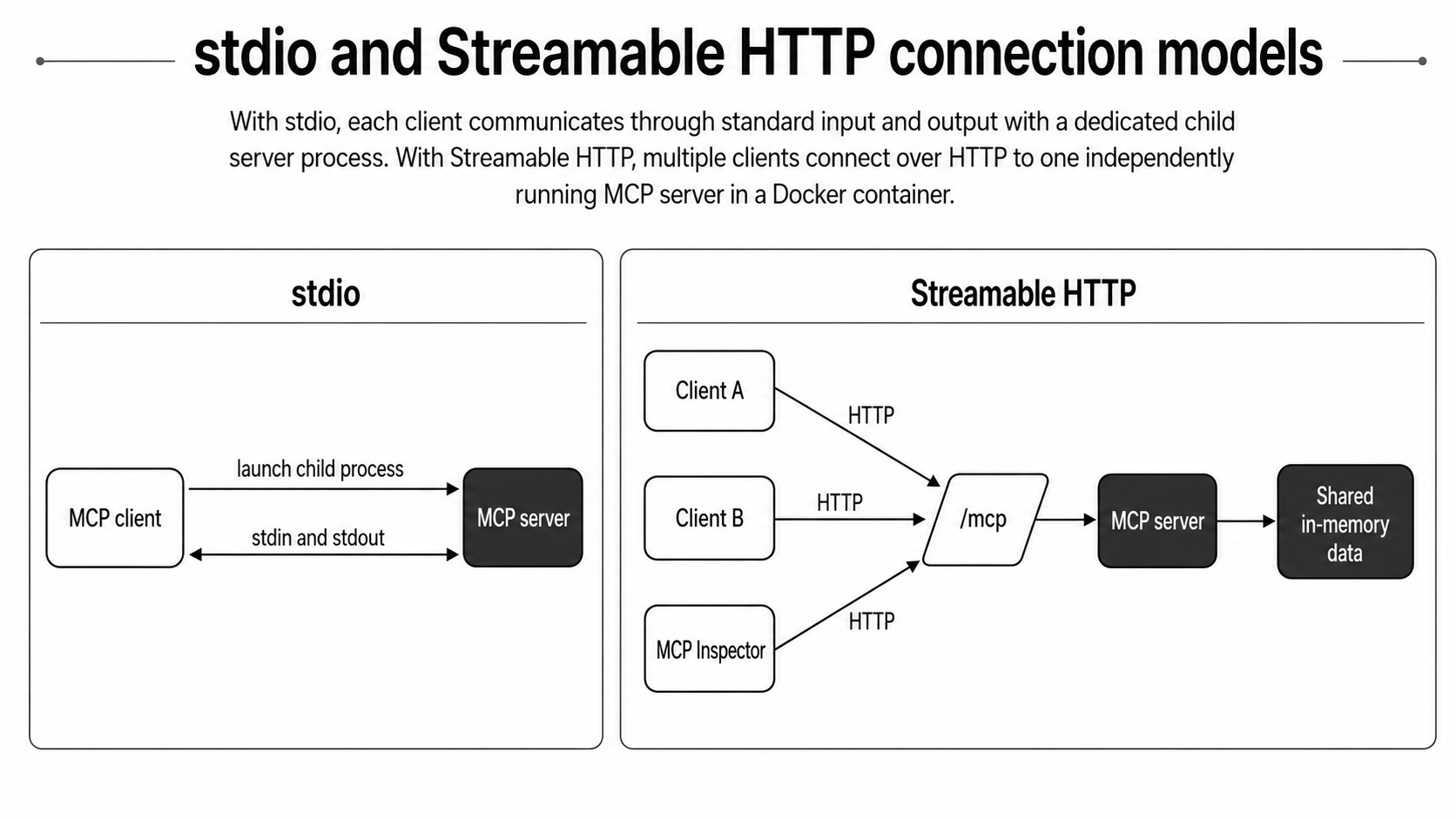
A Streamable HTTP server exposes one MCP endpoint that handles POST and GET. A stateful implementation may also handle DELETE so clients can terminate sessions explicitly. MCP transport specification
This guide will:
- Preserve the existing tools and application logic
- Switch the startup transport to Streamable HTTP
- Observe stateful MCP sessions
- Distinguish JSON responses from SSE responses
- Separate the container's listening address from the host's published address
- Connect two clients concurrently
- Validate Host and Origin values against allowlists
OAuth 2.1, TLS termination, load balancers, Redis, horizontal scaling, production monitoring, and rate limiting are out of scope. Packaging an application in Docker does not make it production-ready by itself.
How stdio and Streamable HTTP differ
With stdio, the client launches the MCP server as a subprocess. The server reads newline-delimited JSON-RPC messages from stdin and writes MCP messages to stdout. Logs belong on stderr; ordinary log output on stdout can be mistaken for protocol data and break the connection.
With Streamable HTTP, the server is independent of its clients. It continues listening when one client exits, and other clients can connect to the same URL.
Concern | stdio | Streamable HTTP |
|---|---|---|
Startup | Client launches a child process | Server runs as an independent service |
Connection target | Command and arguments | URL |
Connection model | Typically one client per process | Can handle multiple clients |
Communication |
| HTTP POST / GET and optionally DELETE |
Streaming | Standard streams | SSE when needed |
Typical failures | Child-process exit, corrupted stdout | Disconnects, timeouts, proxies, reconnection |
Security boundary | Primarily local OS and process boundary | Network, Origin, TLS, authentication, authorization |
Streamable HTTP is not the same as turning every tool into a REST endpoint. We are not implementing POST /tasks and GET /tasks. JSON-RPC messages travel through a single endpoint—normally /mcp—and the SDK handles MCP methods such as tools/list and tools/call before dispatching to registered tools.
Complete code: The implementation, setup, and test suite are available in the GitHub repository. The filenames shown above the remaining code blocks correspond to paths in that repository.
Separating tools from the transport
If HTTP headers or SSE behavior leak into tool functions, application logic becomes coupled to one transport. Instead, task storage belongs in a service layer, while tools remain thin adapters that pass validated inputs to that service.
mcp-streamable-http-demo/
├── pyproject.toml
├── uv.lock
├── Dockerfile
├── compose.yaml
├── .dockerignore
├── src/task_mcp/
│   ├── server.py
│   ├── settings.py
│   ├── services/task_service.py
│   └── tools/tasks.py
└── clients/concurrent_clients.py
This block describes the repository layout rather than a process flow, so a Mermaid diagram would not add useful information.
Start with an in-memory service that can safely receive concurrent asynchronous tool calls.
import asyncio
from dataclasses import asdict, dataclass
from uuid import uuid4


@dataclass(frozen=True)
class Task:
    id: str
    title: str


class TaskService:
    def __init__(self) -> None:
        self._tasks: list[Task] = []
        self._lock = asyncio.Lock()

    async def create(self, title: str) -> dict[str, str]:
        normalized = title.strip()
        if not normalized:
            raise ValueError("title must not be empty")

        task = Task(id=str(uuid4()), title=normalized)
        async with self._lock:
            self._tasks.append(task)
        return asdict(task)

    async def list_all(self) -> list[dict[str, str]]:
        async with self._lock:
            return [asdict(task) for task in self._tasks]
The asyncio.Lock protects concurrent updates only inside this process. Additional workers or containers would each have a separate list and lock, so a shared database or another external store would be required.
The tools delegate to the service.
from task_mcp.services.task_service import TaskService

service = TaskService()


async def create_task(title: str) -> dict[str, str]:
    """Create a task in the shared in-memory store."""
    return await service.create(title)


async def list_tasks() -> list[dict[str, str]]:
    """List tasks shared by all client sessions."""
    return await service.list_all()
There are no HTTP requests, session headers, CORS rules, or Docker-specific operations here. The same functions can be used by a stdio server or called directly from unit tests.
Implementing the Streamable HTTP server
Read the listening address, port, allowed Host values, and allowed Origin values from the environment. Prefer exact Origin entries and add only the development origins that are actually needed.
import os
from dataclasses import dataclass, field


def csv_env(name: str, default: str) -> list[str]:
    return [value.strip() for value in os.getenv(name, default).split(",") if value.strip()]


def port_env(name: str = "MCP_PORT", default: str = "8000") -> int:
    value = int(os.getenv(name, default))
    if not 1 <= value <= 65535:
        raise ValueError(f"{name} must be between 1 and 65535")
    return value


@dataclass(frozen=True)
class Settings:
    host: str = field(default_factory=lambda: os.getenv("MCP_HOST", "127.0.0.1"))
    port: int = field(default_factory=port_env)
    allowed_hosts: list[str] = field(
        default_factory=lambda: csv_env("MCP_ALLOWED_HOSTS", "127.0.0.1:*,localhost:*,[::1]:*")
    )
    allowed_origins: list[str] = field(
        default_factory=lambda: csv_env(
            "MCP_ALLOWED_ORIGINS",
            "http://127.0.0.1:*,http://localhost:*,http://[::1]:*",
        )
    )
Register the tools with FastMCP. This article explicitly selects a stateful configuration—stateless_http=False and json_response=False—so that session IDs and SSE behavior are visible.
from contextlib import suppress

from mcp.server.fastmcp import FastMCP
from mcp.server.transport_security import TransportSecuritySettings

from task_mcp.settings import Settings
from task_mcp.tools.tasks import create_task, list_tasks


def create_server(settings: Settings | None = None) -> FastMCP:
    configured = settings or Settings()
    server = FastMCP(
        "Task Server",
        host=configured.host,
        port=configured.port,
        streamable_http_path="/mcp",
        stateless_http=False,
        json_response=False,
        transport_security=TransportSecuritySettings(
            enable_dns_rebinding_protection=True,
            allowed_hosts=configured.allowed_hosts,
            allowed_origins=configured.allowed_origins,
        ),
    )
    server.add_tool(create_task)
    server.add_tool(list_tasks)

    @server.tool()
    def get_server_info() -> dict[str, object]:
        """Return non-sensitive runtime configuration."""

        return {
            "transport": "streamable-http",
            "host": configured.host,
            "port": configured.port,
            "stateful": True,
            "storage": "process-memory",
        }

    return server


settings = Settings()
mcp = create_server(settings)


def main() -> None:
    with suppress(KeyboardInterrupt):
        mcp.run(transport="streamable-http")


if __name__ == "__main__":
    main()
The stable v1 SDK exposes TransportSecuritySettings for Host and Origin validation. Its middleware returns 421 for a disallowed Host and 403 for a disallowed Origin. Recent v1 releases also enable protection automatically when FastMCP binds to localhost, but a container binds to 0.0.0.0, so the security settings are explicit here. Python SDK transport security source
A local environment can use these defaults:
MCP_HOST=127.0.0.1
MCP_PORT=8000
MCP_PUBLISH_PORT=8000
MCP_ALLOWED_HOSTS=127.0.0.1:*,localhost:*,[::1]:*
MCP_ALLOWED_ORIGINS=http://127.0.0.1:*,http://localhost:*,http://[::1]:*
curl can verify basic HTTP reachability, but it is not a complete MCP client. Correct operation requires initialization, protocol-version negotiation, JSON-RPC IDs, session handling, and notifications. Use an MCP client or Inspector for the real test.
Understanding MCP sessions
An MCP session groups logically related interactions between a client and server. A stateful server can attach MCP-Session-Id to the HTTP response containing its InitializeResult. The client then includes that value on subsequent HTTP requests.
sequenceDiagram
    accTitle: Establishing and terminating a Streamable HTTP session
    accDescr: The client sends an initialization request and receives a session ID from the server. It includes the same ID when listing and invoking tools, then requests termination with DELETE when the session is no longer needed.
    participant C as MCP client
    participant S as MCP server
    C->>S: POST /mcp InitializeRequest
    S-->>C: InitializeResult and MCP-Session-Id
    C->>S: POST tools/list with session ID
    S-->>C: Tool definitions
    C->>S: POST tools/call with session ID
    S-->>C: Tool result
    C->>S: DELETE /mcp with session ID
    S-->>C: Session terminated
Establishing and terminating a session
The specification recommends that a server requiring sessions return 400 when a post-initialization request omits the session ID. An expired or invalid ID results in 404, after which the client starts again with a new InitializeRequest. A server that does not allow client-initiated termination may return 405 for DELETE. MCP transport specification
A session ID is not an authentication credential. Its presence does not establish who the caller is, whether the caller can execute a tool, or whether the caller may read a particular record. A session identifies communication state. Authentication determines who is connecting, and authorization determines what that identity is allowed to do.
MCP session state is also separate from application data. In this implementation, clients A and B receive different session IDs, but their tools access the same TaskService instance. A task created by A is therefore visible to B. Conversely, terminating A's MCP session does not delete the tasks.
The official SDK supports several combinations:
Mode | Configuration | Characteristics |
|---|---|---|
Stateful + SSE | Defaults | Makes sessions observable and supports notifications and streams |
Stateless + SSE |
| Reduces server-side session dependency while retaining streaming |
Stateless + JSON |
| Well suited to straightforward responses and horizontal scaling |
The Python SDK recommends Stateless + JSON when scalability is the priority. Building Servers
With a stateful server distributed across containers, one instance may process initialization while another receives the next request. You then need session affinity, a shared session store, or a stateless design. Application data must likewise move from process memory to a shared database or service.
The role of SSE in Streamable HTTP
Streamable HTTP is not the same transport as the former HTTP+SSE transport. Streamable HTTP replaced the transport defined in the 2024-11-05 protocol version, but the current transport may still use SSE as a response format.
A client sends each JSON-RPC message in a new POST request. For a JSON-RPC request, the server can either return one JSON object as application/json or start an SSE stream as text/event-stream. Clients must support both. A client may also issue GET to open an SSE stream for server-initiated notifications and requests.
A JSON response is usually preferable when a tool finishes quickly, sends no intermediate notifications, and fits a simple request-response interaction. SSE is useful for progress notifications, multiple messages, server-to-client notifications, and long-running work.
Selecting SSE also adds operational concerns: idle timeouts, reverse-proxy buffering, disconnects, reconnection, duplicate delivery, cancellation, and graceful container shutdown. A disconnected stream does not mean that the operation was cancelled. The client should send an MCP cancellation notification when cancellation is intended.
Servers can attach IDs to SSE events, and reconnecting clients can send Last-Event-ID to request redelivery. Reliable resumption still requires an event store and application behavior that can tolerate duplicate messages.
Standardizing the runtime with Docker
Define the project dependency as follows. The <2 boundary avoids unintentionally adopting the prerelease v2 API, while the committed uv.lock pins the exact package set used by the build.
[project]
name = "mcp-streamable-http-demo"
version = "0.1.0"
requires-python = ">=3.13"
dependencies = [
  "mcp[cli]>=1.27,<2",
]

[build-system]
requires = ["hatchling"]
build-backend = "hatchling.build"

[tool.hatch.build.targets.wheel]
packages = ["src/task_mcp"]
The Dockerfile copies dependency metadata before source code so Docker can reuse the dependency layer. It runs the application as a non-root user, and the exec-form CMD allows runtime signals to reach the Python process cleanly.
FROM ghcr.io/astral-sh/uv:python3.13-bookworm-slim

WORKDIR /app

ENV UV_COMPILE_BYTECODE=1 \
    UV_LINK_MODE=copy

COPY pyproject.toml uv.lock ./
RUN uv sync --frozen --no-dev --no-install-project

COPY src ./src
RUN uv sync --frozen --no-dev

RUN useradd --create-home --uid 10001 appuser \
    && chown -R appuser:appuser /app
USER appuser

ENV PATH="/app/.venv/bin:$PATH"
EXPOSE 8000

CMD ["python", "-m", "task_mcp.server"]
.git
.venv
__pycache__
.pytest_cache
.env
clients
tests
Binding to 127.0.0.1 inside the container restricts the socket to the container's own loopback interface, making it unreachable through Docker's port forwarding. The server must therefore listen on 0.0.0.0:8000 inside the container. The published host address remains restricted to 127.0.0.1.
services:
  task-mcp:
    build: .
    environment:
      MCP_HOST: 0.0.0.0
      MCP_PORT: 8000
      MCP_ALLOWED_HOSTS: 127.0.0.1:*,localhost:*,[::1]:*
      MCP_ALLOWED_ORIGINS: http://127.0.0.1:*,http://localhost:*,http://[::1]:*
    ports:
      - "127.0.0.1:${MCP_PUBLISH_PORT:-8000}:8000"
    restart: unless-stopped
If host port 8000 is already in use, change only the published port with a command such as MCP_PUBLISH_PORT=8766 docker compose up --build, then point the client's MCP_URL at the same port. The container continues listening on port 8000.
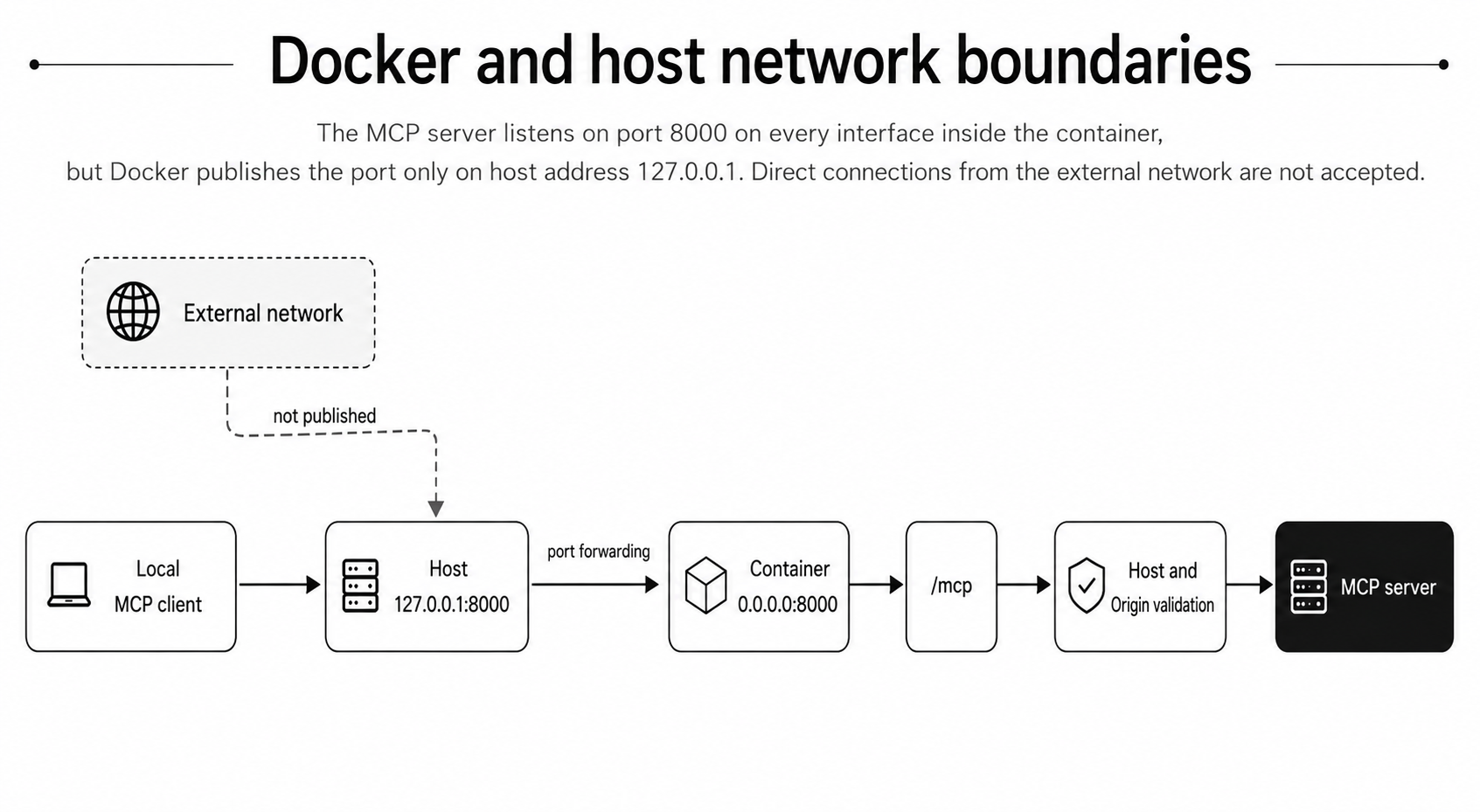
Start the service with docker compose up --build. Containerization standardizes Python, dependencies, and the startup command, but it does not add TLS, authentication, secret management, monitoring, or backups. Docker describes a container as a portable unit that packages an application with its runtime dependencies—not as a complete production security boundary. Docker Python guide
Connecting multiple MCP clients
Use the official streamable_http_client and ClientSession. The following program opens two sessions concurrently. Client A creates a task, then client B reads it from the shared application store.
import asyncio

from mcp import ClientSession
from mcp.client.streamable_http import streamable_http_client

URL = "http://127.0.0.1:8000/mcp"


async def client_a(created: asyncio.Event) -> None:
    async with streamable_http_client(URL) as (read, write, get_session_id):
        async with ClientSession(read, write) as session:
            await session.initialize()
            session_id = get_session_id()
            print("A session:", session_id[:8] if session_id else "stateless")
            result = await session.call_tool(
                "create_task",
                arguments={"title": "Review Streamable HTTP logs"},
            )
            print("A created:", result)
            created.set()
            await asyncio.sleep(0.5)


async def client_b(created: asyncio.Event) -> None:
    async with streamable_http_client(URL) as (read, write, get_session_id):
        async with ClientSession(read, write) as session:
            await session.initialize()
            session_id = get_session_id()
            print("B session:", session_id[:8] if session_id else "stateless")
            await created.wait()
            result = await session.call_tool("list_tasks", arguments={})
            print("B listed:", result)


async def main() -> None:
    created = asyncio.Event()
    await asyncio.gather(client_a(created), client_b(created))


if __name__ == "__main__":
    asyncio.run(main())
If A and B print different session-ID prefixes and B's result contains the task created by A, you have confirmed that communication sessions are isolated while application data is shared. In production logs, avoid recording complete session IDs by default; use a truncated or hashed correlation value.
MCP Inspector can also connect with Streamable HTTP at http://127.0.0.1:8000/mcp. It is the official interactive tool for inspecting tool definitions, input schemas, results, logs, and notifications. MCP Inspector
Separating CORS, Origin validation, TLS, and authentication
These mechanisms appear near the same HTTP boundary, but they solve different problems.
Mechanism | Primary responsibility | What it does not prevent |
|---|---|---|
CORS | Controls cross-origin reads by browser JavaScript | Direct access from curl or another server |
Host and Origin validation | Rejects unexpected origins and mitigates DNS rebinding | Identifying the user |
TLS | Prevents interception and modification in transit | An authenticated user exceeding their permissions |
Authentication | Establishes who is connecting | Deciding every operation that identity may perform |
Authorization | Decides what an identity may do | Network interception |
CORS matters primarily when browser JavaScript connects directly to an MCP server on another origin. Allow only required origins, methods such as GET, POST, and DELETE, and the necessary request headers. In a stateful configuration, expose Mcp-Session-Id so browser code can read it from the initialization response. The official SDK documentation demonstrates this with Starlette's CORSMiddleware. Python SDK CORS guidance
CORS is a browser enforcement mechanism. curl, Python applications, and backend services do not enforce it. Configuring CORS therefore does not remove the need for authentication.
Origin validation is performed by the MCP server itself. The MCP specification requires servers to validate a present Origin header to mitigate DNS rebinding and return 403 for an invalid value. This example's TransportSecuritySettings also validates the Host header. Legitimate non-browser clients may omit Origin, so Origin validation should be combined with authentication and a suitable network boundary rather than treating absence alone as identity.
TLS protects tool inputs, results, session IDs, and Authorization headers while they cross the network. A production deployment outside localhost normally terminates HTTPS at a reverse proxy or load balancer and protects the backend hop according to its trust boundary.
Never expose an unauthenticated MCP server publicly
MCP tools can modify files, update databases, send email, create tickets, operate cloud resources, or delete data. If an unauthenticated server is public, an attacker does not need to use an AI client; any program that speaks MCP can invoke its tools directly.
None of the following substitutes for authentication:
- A difficult-to-guess URL
- An MCP session ID
- CORS or an Origin allowlist
- HTTPS
- Docker
- Undocumented tool names
- Warnings in tool descriptions
- A confirmation message displayed by an AI model
The acceptable scope for this article is a port published only on 127.0.0.1, an isolated Docker network, or a temporary closed test environment. Do not publish the host port on every interface, attach the service directly to a public IP, or deploy it to a public cloud endpoint without authentication.
Remote MCP servers that handle user-specific data, administrative operations, audit requirements, or per-user rate limits need authentication and authorization. The official MCP guidance describes authorization for HTTP-based remote servers using conventions based on OAuth 2.1. Understanding Authorization in MCP
Conclusion
Moving from stdio to Streamable HTTP is more than changing a startup option. It turns an MCP server from a client-managed local process into an independently operated network service used by multiple clients.
A stateful server manages communication sessions, but those sessions are neither authentication nor application data. Streamable HTTP may use SSE when streaming is needed, but it is distinct from the former HTTP+SSE transport. Inside Docker, the server can bind to 0.0.0.0 while Docker publishes the port only on host address 127.0.0.1.
Finally, CORS, Origin validation, TLS, authentication, and authorization each have a separate responsibility. A Docker image does not complete the production security model. Until authentication is implemented, keep the MCP endpoint on localhost or inside a closed test environment.