1. Introduction: Why Does a Small Configuration Make Tools Available?
The README for a public MCP server often makes setup look deceptively simple: add command and args to a configuration file, restart the AI client, and the tools appear. That leaves several important questions unanswered:
- Why is there no URL or port for something called a server?
- What do
command,args, andenvactually represent? - How does the AI learn which tools the server provides?
- Where should you look when the client reports “MCP server disconnected”?
The key is the stdio transport, which is commonly used by local MCP servers.
With stdio, the AI client launches the MCP server as a child process and uses that process’s standard input and output as the communication channel. The configuration is not merely a plugin list. It tells the client which child process to start, which arguments to pass, and which process streams to use for MCP messages.
This article uses Claude Desktop and the official Filesystem MCP Server to cover manual startup, client configuration, initialization, tool discovery and execution, environment variables, and troubleshooting. The underlying model also applies to other stdio-capable clients, including Codex and IDE integrations. Configuration locations, formats, and approval interfaces still vary by client.
The scope is local stdio connectivity. Remote connections using Streamable HTTP and OAuth are outside the scope of this article.
For an explanation of MCP, please refer to this article.
2. What We Are Building
After setup, a request follows this path:
User
  ↓ instruction
Host containing the AI model, such as Claude Desktop
  ↓ tool selection
MCP Client
  ↓ JSON-RPC over stdin / stdout
Filesystem MCP Server
  ↓
Allowed local directory
The official MCP architecture overview separates the participants into three roles:
- Host: The overall AI application, responsible for conversations, models, permissions, and multiple connections
- Client: A component that maintains a connection to one MCP server
- Server: A program that exposes tools, resources, prompts, or other capabilities
A host typically creates a separate MCP client for each connected server. The AI model does not directly connect to or manage the server process; the MCP client inside the host handles that communication.
3. How Local stdio Integration Works
3.1 stdin, stdout, and stderr
A process launched by an operating system normally has three standard streams:
stdin: Standard input received by the processstdout: Standard output produced by the processstderr: A separate stream for logs and diagnostics
With the stdio transport, the MCP client starts the MCP server as a child process. JSON-RPC messages from the client are written to the server’s stdin, while messages from the server are read from its stdout.
The MCP 2025-11-25 transport specification requires UTF-8 JSON-RPC messages delimited by newlines. A server must therefore never write non-MCP text to stdout. Diagnostic output belongs on stderr.
// Incorrect: may corrupt the JSON-RPC stream on stdout
console.log("Server started");

// Correct: send diagnostic logs to stderr
console.error("Server started");
Output on stderr does not necessarily indicate a failure. A client may record, forward, or ignore it.
3.2 How It Differs from Streamable HTTP
Aspect | stdio | Streamable HTTP |
|---|---|---|
Typical deployment | Local process integration | Network-accessible service |
Connection target | Child process launched by the client | HTTP endpoint |
URL and port | Usually unnecessary | Required |
Communication path | stdin and stdout | HTTP POST, optionally SSE |
Server startup | Managed by the client | Runs independently |
Credentials | Commonly environment variables | HTTP authentication or OAuth |
The words “client” and “server” still describe their protocol roles under stdio. They do not imply that the server listens on localhost. Two processes on the same machine communicate through pipes instead.
4. Starting the Filesystem MCP Server Manually
4.1 Prerequisites
The Filesystem MCP Server runs on Node.js. Verify the runtime and create a directory for the exercise:
node --version
npx --version
mkdir -p ~/mcp-demo
Start the server with:
npx -y @modelcontextprotocol/server-filesystem ~/mcp-demoEach part has a distinct role:
npx: Runs a command provided by an npm package-y: Automatically accepts prompts related to obtaining the package@modelcontextprotocol/server-filesystem: The npm package to run~/mcp-demo: The directory the server may access
In this terminal command, the shell expands ~ to your home directory. A client may spawn the configured command without invoking a shell, so use a full absolute path in the JSON configuration later.
According to the official Filesystem MCP Server README, the server exposes tools for reading and writing files, managing directories, searching, and inspecting metadata. Access is restricted through command-line directories or, when supported by the client, MCP Roots. Grant only the directories that the server genuinely needs.
4.2 No Output Does Not Necessarily Mean Failure
The terminal may appear to freeze after startup. A stdio server is not a conventional interactive CLI; it is usually waiting for an MCP message on stdin.
You can stop it with Ctrl+C. If no exception appeared, process startup may have succeeded, but this does not prove that initialization or tool execution works. Use MCP Inspector, introduced later, to test the protocol itself.
5. Registering the Server with an AI Client
Open the Claude Desktop configuration and register the server as follows. On macOS, the file is normally available through the Developer settings and stored at ~/Library/Application Support/Claude/claude_desktop_config.json. On Windows, it is %APPDATA%\Claude\claude_desktop_config.json. Client interfaces and paths can change, so also check the documentation for the version you use.
{
  "mcpServers": {
    "filesystem": {
      "command": "npx",
      "args": [
        "-y",
        "@modelcontextprotocol/server-filesystem",
        "/Users/username/mcp-demo"
      ]
    }
  }
}
Conceptually, this describes a process operation similar to:
spawn("npx", [
  "-y",
  "@modelcontextprotocol/server-filesystem",
  "/Users/username/mcp-demo"
]);
5.1 Server Name, command, and args
filesystem: A local name the client uses to identify the connectioncommand: The executable to launch—in this case,npxargs: An ordered array of command-line arguments
Do not put the entire shell command into one args string. Separate each argument into its own array element. A path containing spaces should still be one array element.
5.2 Why Absolute Paths Matter
A server launched by a GUI application may not have the same working directory as a command launched in your terminal. Use an absolute path instead of ./mcp-demo or ~/mcp-demo:
"/Users/username/mcp-demo"If the client cannot find npx, locate it with which npx on macOS or Linux, or where npx on Windows, and use an absolute executable path when supported. On Windows, the official Filesystem Server examples may require command to be cmd with args beginning with ["/c", "npx", ...].
After saving the file, fully quit and reopen Claude Desktop rather than merely closing its window. The official local server guide instructs users to restart the application so it can reload the configuration and launch the server.
6. What Happens Before the Server Becomes Available
After reading the configuration, the client generally performs the following sequence:
1. Read the configuration file
2. Launch the server using command and args
3. Connect pipes to the server’s stdin and stdout
4. Send an initialize request
5. Check the protocol version and capabilities
6. Send notifications/initialized
7. Fetch tool definitions with tools/list
8. Register those tools for use by the host and AI model
6.1 initialize: Establishing the Session
The first protocol interaction is initialize. A simplified request looks like this:
{
  "jsonrpc": "2.0",
  "id": 1,
  "method": "initialize",
  "params": {
    "protocolVersion": "2025-11-25",
    "capabilities": {},
    "clientInfo": {
      "name": "example-client",
      "version": "1.0.0"
    }
  }
}
The server responds with the protocol version it selects, capabilities such as tools or resources, and serverInfo. If the client cannot support the returned version, it should disconnect. After a successful response, the client announces that initialization is complete:
{
  "jsonrpc": "2.0",
  "method": "notifications/initialized"
}
The MCP lifecycle specification defines initialization as the first interaction and uses it to establish version compatibility, capabilities, and implementation information. The version above identifies the specification used for this article; real clients and servers negotiate a mutually supported value.
6.2 tools/list: Discovering Available Tools
Once initialization is complete, the client can request the tool catalog:
{
  "jsonrpc": "2.0",
  "id": 2,
  "method": "tools/list"
}
The response describes each tool with fields such as name, description, and inputSchema. The input schema is JSON Schema that tells the client which arguments exist, their types, and which are required. The client registers this metadata with the host so the model can decide which operation is available and how to call it.
6.3 The AI Model Does Not Manage the Process Directly
The responsibilities are divided as follows:
- The AI model selects a tool from definitions supplied by the host
- The host applies permissions and may request user approval
- The MCP client sends a JSON-RPC
tools/callrequest - The MCP server performs the actual filesystem operation
The model itself does not launch npx or write directly to the child process’s stdin.
7. Calling a Tool from the AI Client
After the connection is ready, ask Claude Desktop:
Create hello.txt in the mcp-demo directory.
Set its contents to “Hello, MCP!”
The execution result is shown below, confirming that the MCP server was successfully invoked.
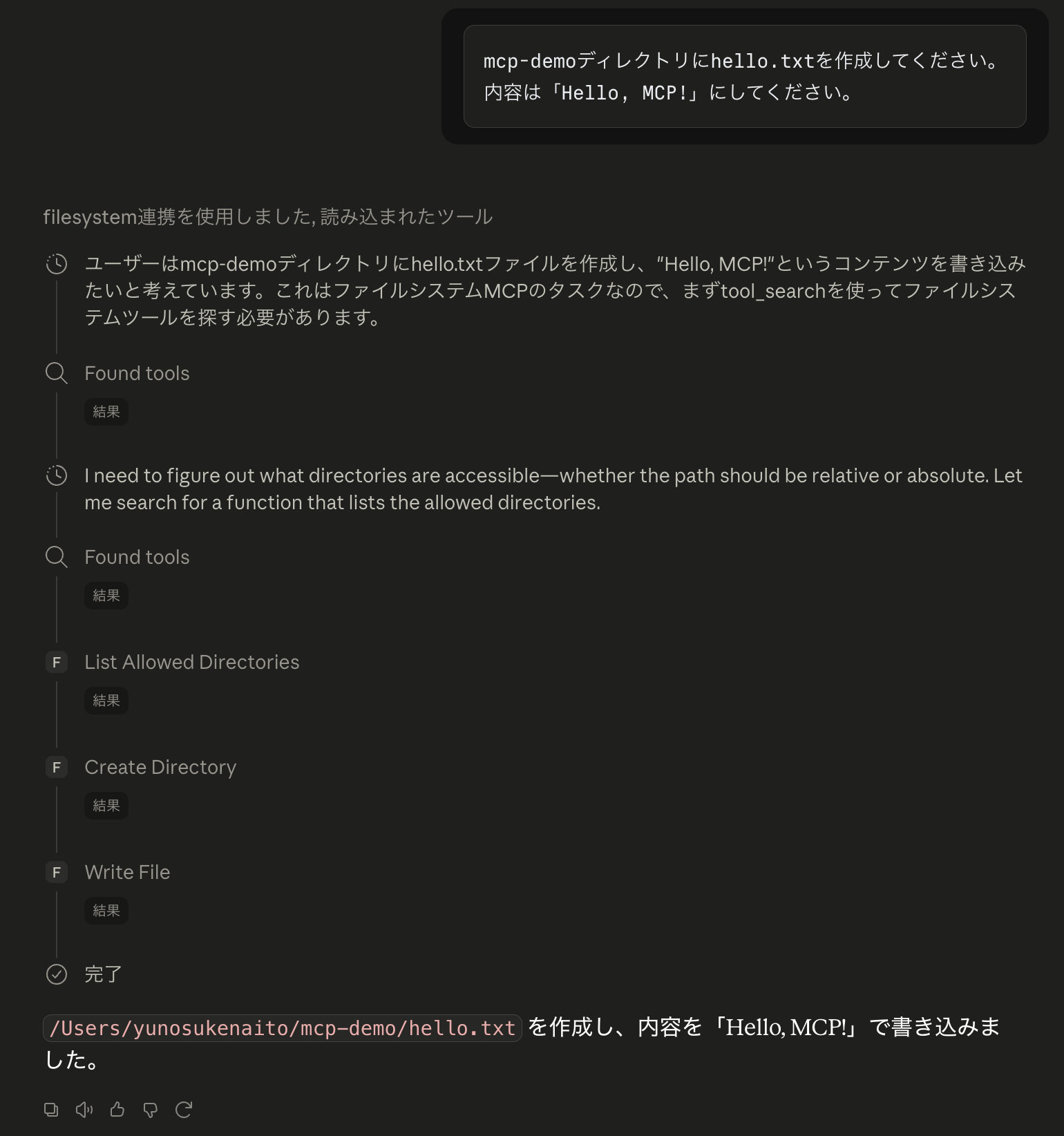
The contents of the generated file are as follows:
cat ~/mcp-demo/hello.txt
Hello, MCP!
If the model selects the Filesystem Server’s write_file tool, the MCP client conceptually sends:
{
  "jsonrpc": "2.0",
  "id": 3,
  "method": "tools/call",
  "params": {
    "name": "write_file",
    "arguments": {
      "path": "/Users/username/mcp-demo/hello.txt",
      "content": "Hello, MCP!"
    }
  }
}
The end-to-end flow is:
User instruction
  ↓
AI model proposes write_file
  ↓
Host requests user approval when required
  ↓
MCP Client sends tools/call
  ↓
Filesystem MCP Server writes the file
  ↓
Server returns the tool result over JSON-RPC
  ↓
AI model explains the result to the user
The MCP Tools specification defines tools/list for discovery and tools/call for execution. It also recommends interfaces that clearly expose tool activity and let a human deny an invocation.
8. Passing Environment Variables with env
A stdio server that requires an API key can receive it through the child process environment using env:
{
  "mcpServers": {
    "example": {
      "command": "npx",
      "args": [
        "-y",
        "example-mcp-server"
      ],
      "env": {
        "EXAMPLE_API_KEY": "your-api-key"
      }
    }
  }
}
The server can read the value through process.env.EXAMPLE_API_KEY in Node.js or os.environ["EXAMPLE_API_KEY"] in Python.
A process launched from a GUI application does not necessarily receive the same environment as a process started in your terminal. The official MCP debugging guide notes that stdio servers may automatically inherit only a limited, platform-dependent set of variables. Declare required values explicitly with env.
Do not commit configuration files containing real credentials to Git. Prefer an operating-system keychain, secret store, or client-provided environment-variable reference when available. Protect the configuration file and ensure logs do not reveal secrets.
The standard MCP authorization flow primarily targets HTTP transports. The authorization specification states that stdio implementations should retrieve credentials from the environment instead of following the HTTP authorization flow.
9. Troubleshooting Connection Failures
Instead of searching for a generic “MCP server disconnected” message, identify the layer where the connection fails.
9.1 Confirm That the Configuration Is Loaded
Check the following first:
- The JSON has no trailing commas, missing quotes, or mismatched braces
- You edited the correct configuration file
mcpServers,command, andargshave the expected types- You fully quit and restarted the client
If the server name never appears in the interface, start at this layer.
9.2 Run the Exact Command Manually
Test the configured operation in a terminal:
npx -y @modelcontextprotocol/server-filesystem \
  /Users/username/mcp-demo
A failure here occurs before MCP initialization. Check whether Node.js and npx exist, whether the GUI client has a different PATH, whether npm can obtain the package, whether the directory exists, and whether your user has permission to access it.
9.3 Inspect the Client Logs
The official Claude Desktop guide documents MCP logs under ~/Library/Logs/Claude on macOS and %APPDATA%\Claude\logs on Windows. On macOS, you can follow them with:
tail -n 20 -F ~/Library/Logs/Claude/mcp*.logAvoid recording API keys, personal information, or sensitive file contents in diagnostic logs.
9.4 Check stdout and Environment Variables
For a custom server, confirm that ordinary logs are not written to stdout. Even a single startup message can corrupt the JSON-RPC stream. Send diagnostics to stderr instead.
For an API-backed server, verify the variable name, value, env configuration, and client restart. If the server works in a terminal but not from the GUI client, differences in PATH and environment variables are strong suspects.
9.5 Test the Server with MCP Inspector
MCP Inspector connects to a stdio server without involving the target AI client. It can display capabilities, tool definitions, input schemas, and tool execution results.
npx -y @modelcontextprotocol/inspector \
  npx -y @modelcontextprotocol/server-filesystem \
  /Users/username/mcp-demo
If the server works in Inspector but not in Claude Desktop, investigate the client configuration, environment, and approval state. If Inspector also fails, focus on process startup or MCP protocol behavior.
9.6 Classify the Failure into Four Stages
1. The process cannot start
   → Check command, PATH, Node.js, arguments, and permissions

2. initialize fails
   → Check stdout pollution, exceptions, versions, and capabilities

3. tools/list fails
   → Check the tools capability, tool definitions, and JSON Schema

4. Only tools/call fails
   → Check the tool name, arguments, allowed directories, and permissions
This classification turns a vague connectivity problem into separate questions about the operating-system process, transport, MCP lifecycle, and individual tool execution.
10. Conclusion
A stdio configuration tells an AI client how to launch a child process. command identifies the executable, args supplies its arguments, and env defines environment variables for the child process.
After startup, the client and server exchange JSON-RPC through stdin and stdout. They negotiate versions and capabilities with initialize, discover tools using tools/list, and execute a selected tool with tools/call. The host and MCP client manage this connection; the AI model does not operate the process directly.
When something fails, investigate configuration loading, process startup, initialize, tools/list, and tools/call in that order. Absolute paths, missing environment variables, and accidental logging to stdout are especially important checks for a local stdio connection.