Introduction: Everything Starts to Look Like a Tool
Imagine exposing a task management service through an MCP server. You need to retrieve tasks, search them, create them, change their status, plan the day, and run a weekly review. Because SDKs make Tools easy to register, the obvious first implementation is to turn every capability into one.
Tools, Resources, and Prompts are not alternative syntaxes for the same feature. The most useful distinction is not merely “actions, data, and instructions.” It is who initiates their use.
Primitive | In one phrase | Primary initiator |
|---|---|---|
Tools | Execute operations | AI model |
Resources | Provide data as context | Application |
Prompts | Start reusable instructions or workflows | User |
This corresponds to the model-controlled, application-driven, and user-controlled categories in the official specification. As of July 13, 2026, the official site identifies version 2025-11-25 as the latest stable specification.
How Tools, Resources, and Prompts Differ
Tools Are Operations the Model Executes
Tools expose operations that a model can choose to invoke based on the conversation. They may call APIs, query databases, perform calculations, or update external systems.
Crucially, Tools are not limited to writes. The Tools specification explicitly lists database queries and calculations as examples.
 tasks.create
 tasks.update_status
 tasks.search
 tasks.calculate_workload
If the model must assemble filters such as “overdue,” “assigned to me,” and “sort by priority,” then run the query at the right point in a conversation, a read-only tasks.search Tool is a natural fit.
Resources Are Addressable Context
Resources expose files, database schemas, and application-specific information as context for a model. Every Resource is identified by a URI.
 task://tasks/TSK-123
 task://projects/PRJ-1/summary
 task://docs/status-rules
 task://users/me/preferences
The Resources specification defines Resource Templates, which can provide dynamic addresses such as task://tasks/{task_id}. Clients can list, search, select, or automatically include Resources in a conversation. Servers may also support list-change notifications and subscriptions to individual Resources.
A Resource is not simply another name for a read endpoint. It is best suited to information that has a meaningful address and whose content should itself become context.
Prompts Are Workflows Selected by the User
Prompts are structured message templates published by a server. They can accept arguments and return messages containing embedded Resources. In a client, they may appear as slash commands or menu actions.
 plan_today
 review_week
 triage_overdue_tasks
 prepare_sprint_retrospective
The Prompts specification describes Prompts as user-controlled features intended for explicit selection. A Prompt is not a hidden system prompt silently injected by the server. It is a discoverable interface that a user deliberately starts, optionally with arguments.
Ask “Who Starts It?” Rather Than “What Does It Return?”
When classification is unclear, focus on the initiator rather than the return type.
- Use a Tool for an operation the model should choose based on the situation.
- Use a Resource for URI-addressable data the application presents as context.
- Use a Prompt for a repeatable procedure the user explicitly starts.
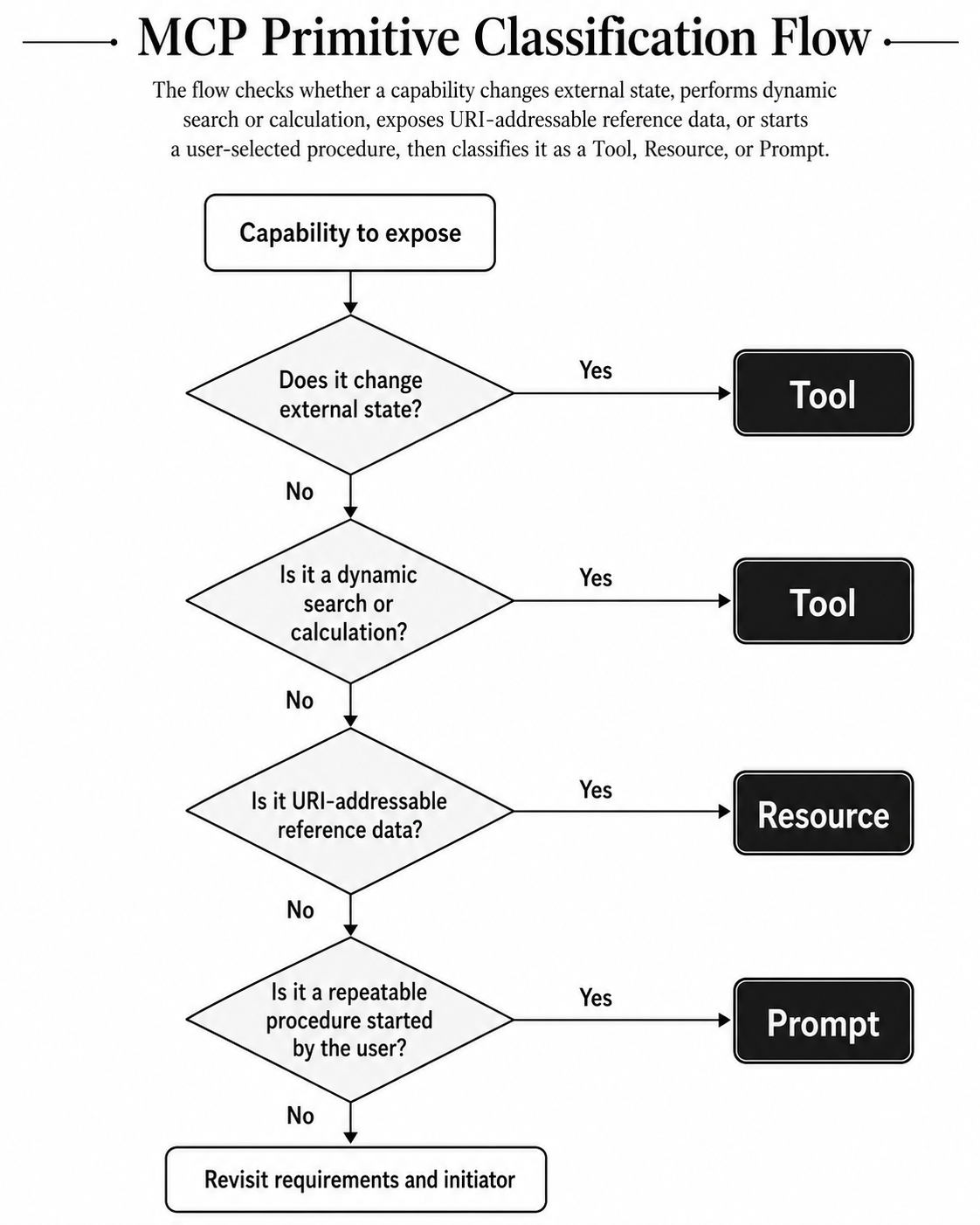
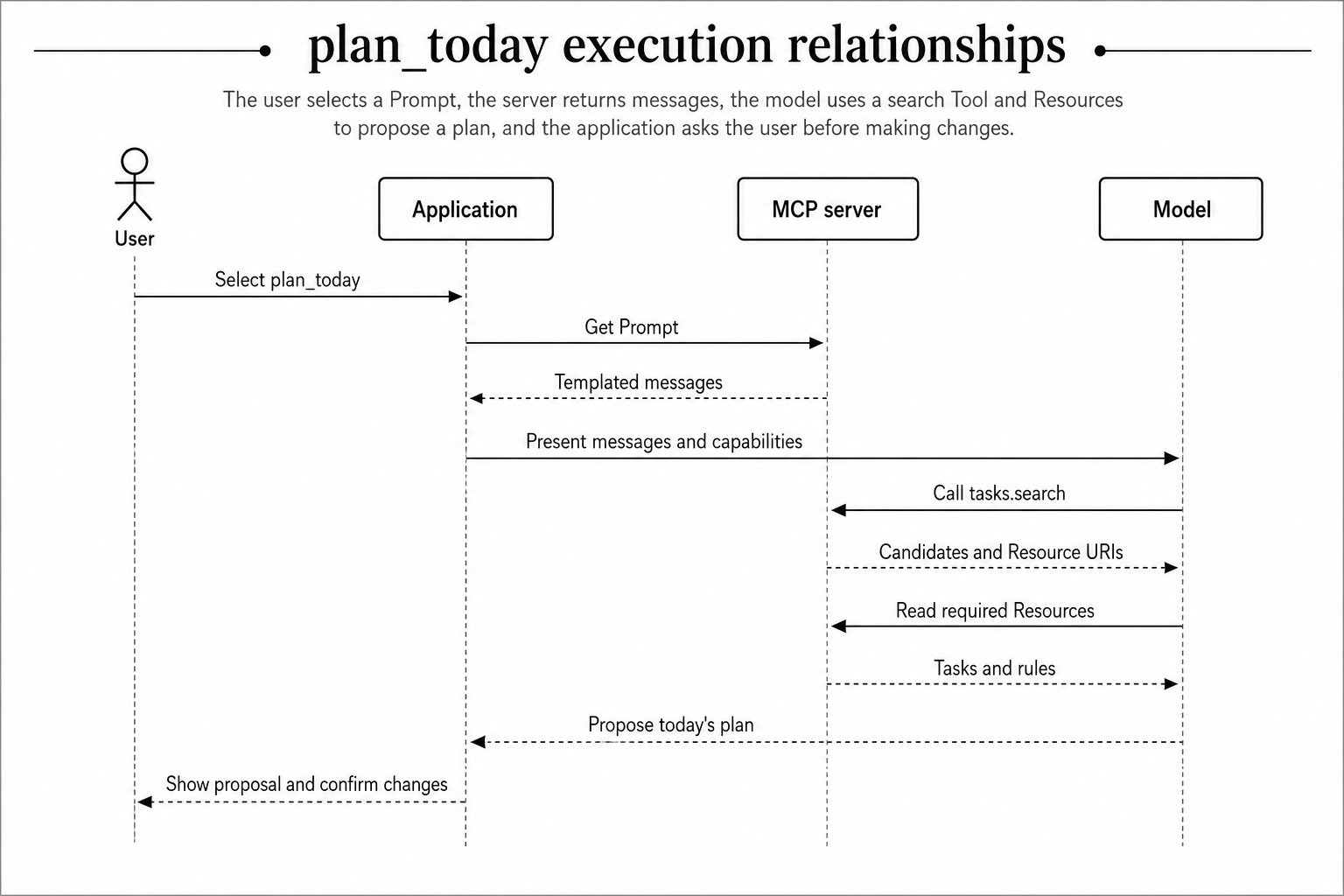
These categories are not mutually exclusive within a workflow. A user may start a Prompt, after which the model invokes Tools. Prompt messages can also contain embedded Resources. The Prompt itself does not directly execute Tools on the server, however. Tool selection and invocation happen through the host, client, and model execution loop.
Mapping a Task Management Service
Create, Update, and Delete Operations Are Tools
 tasks.create
 tasks.update_status
 tasks.assign
 tasks.delete
These operations change external state, so they belong in Tools. Destructive operations such as tasks.delete need authorization, input validation, and audit logging, along with a client experience that allows users to review and reject execution.
MCP annotations can describe destructive behavior, but they are only hints. The server must enforce its own safeguards rather than relying exclusively on a client confirmation screen.
Individual Tasks and Project Information Are Resources
 task://tasks/{task_id}
 task://projects/{project_id}
 task://projects/{project_id}/summary
 task://docs/workflow-rules
The current state of a task, a project description, and workflow rules are addressable reference information. Opening a known task ID is not a query whose conditions must be constructed; it is retrieval of context at a specific address.
Resources still require authorization. An unguessable URI is not an access-control mechanism. Validate the user’s and tenant’s permissions on every read.
Task Search Is a Read-Only Tool
Consider this request:
Find my overdue tasks and sort them by priority.
This is not a read from one URI. The model must construct filters for assignee, due date, completion state, and ordering. A read-only tasks.search Tool is therefore the natural design.
Search results can include a Resource URI for each task, creating a useful split: the Tool handles discovery, while Resources provide detailed context. Add pagination or result limits and return only the structured fields needed for selection instead of an enormous result set.
Daily Planning and Weekly Reviews Are Prompts
 plan_today
 review_week
 prepare_standup
A plan_today Prompt might ask the model to:
- Inspect incomplete tasks.
- Identify overdue work.
- Reconcile priorities.
- Recommend three tasks for today.
- Make changes only after user confirmation.
This is not one API operation. It is a repeatable workflow that the user starts and the model completes by combining Resources and Tools. An official MCP blog example similarly demonstrates Prompts that combine arguments with embedded Resources.
Requirement | Choice | Reason |
|---|---|---|
Create a task | Tool | Changes external state |
Change task status | Tool | Has side effects |
Search with filters | Tool | Model-controlled dynamic query |
Read a task with a known ID | Resource | Has a meaningful URI |
Read workflow rules | Resource | Stable reference information |
Build today’s plan | Prompt | Repeatable user-started procedure |
Run a weekly review | Prompt | Workflow spanning several capabilities |
Why Not Make Everything a Tool?
A model will struggle to distinguish a set like this:
 get_task
 get_task_detail
 fetch_task
 find_task
 search_task
 list_tasks
The problem is not merely the number of Tools; it is overlapping responsibility. Similar inputs and descriptions create more opportunities to select the wrong operation.
If everything is a Tool, tasks, projects, and operational documents also lose their organization within a URI space. Resource Templates, client-side selection, and subscriptions are no longer available. Meanwhile, putting “search, prioritize, propose, then update after confirmation” into Tool descriptions mixes individual operation contracts with a business workflow. A Prompt provides a cleaner home for the repeatable procedure.
Use a Different Axis Than REST GET and POST
The mapping GET → Resource and POST → Tool is incorrect. HTTP methods describe transport-level operations. MCP primitives describe how capabilities are presented and who initiates their use.
Writes should generally be Tools. Reads are divided by purpose.
Good Resource candidates
- Have meaningful URIs
- Are consumed directly as context
- Are selected or viewed by an application or user
- Are referenced repeatedly
Good Tool candidates
- Accept dynamically composed filters
- Require aggregation or calculation
- Are fetched when the model decides they are needed
- Involve complex business processing
Authorization is a cross-cutting requirement for both, not a classification rule.
Designing Tools the Model Can Use Reliably
Show the Boundary Through Names and Descriptions
Combine the domain and operation consistently.
 tasks.create
 tasks.search
 tasks.update_status
 tasks.delete
Avoid names such as execute or task_operation, which reveal neither the target nor the operation. The 2025-11-25 specification recommends names of 1–128 characters using ASCII letters, digits, underscores, hyphens, and periods. Names should be unique within a server.
This description does not define a clear boundary:
Updates a task.A better version states the usage condition and scope:
 Updates the status of one existing task.
 Use this only when the user has requested a status change.
 This tool does not modify the task title, assignee, or due date.
Redesign inputSchema for the Model
Directly exposing a backend request type can reveal internal flags or ambiguous compatibility fields. Design inputSchema as the smallest contract from which the model can reliably construct valid arguments.
{
  "name": "tasks.update_status",
  "description": "Updates the status of one existing task.",
  "inputSchema": {
    "type": "object",
    "additionalProperties": false,
    "properties": {
      "task_id": {
        "type": "string",
        "pattern": "^TSK-[0-9]+$",
        "description": "Stable task identifier, such as TSK-123."
      },
      "status": {
        "type": "string",
        "enum": ["todo", "in_progress", "done"]
      }
    },
    "required": ["task_id", "status"]
  }
}
Prefer an enum to unconstrained text, encode required fields and formats in the schema, and distinguish stable IDs from display names. Do not combine unrelated operations in one Tool.
inputSchema must be a valid JSON Schema object. JSON Schema 2020-12 is the default dialect when $schema is omitted. Tools returning structured results may also define outputSchema.
Annotations Are Not Security Controls
Properties such as readOnlyHint, destructiveHint, idempotentHint, and openWorldHint can describe Tool behavior. The Tools specification, however, requires clients to treat annotations as untrusted unless they come from trusted servers. They do not replace authorization, confirmation, input validation, or idempotency controls.
Conclusion: Decide with Three Questions
- Is this an operation the model should execute when the situation calls for it? → Tool
- Is this URI-addressable data the application should present as context? → Resource
- Is this a repeatable procedure the user explicitly starts? → Prompt
A read can still be a Tool when it performs dynamic search or calculation, while writes are generally Tools. GET is not synonymous with Resource. Prompts are more than fixed strings: they can be the entry point to work that draws on both Resources and Tools.
Instead of porting every REST endpoint directly, design Tool names, descriptions, schemas, Resource URIs, and Prompt procedures as interfaces for models, applications, and users. That is the foundation of an MCP server people—and models—can use predictably.