The features and compatibility described here were checked against each project's official documentation on July 17, 2026. The local LLM ecosystem changes quickly, so verify the latest documentation before deploying a setup.
Here is the short version.
Goal | First choice |
|---|---|
Get started easily with a GUI | LM Studio |
Use an open-source desktop app | Jan |
Work primarily from a terminal or API | Ollama |
Control inference settings in detail | llama.cpp |
Use models from a browser | Open WebUI + Ollama |
Search local documents by folder | GPT4All |
Develop, quantize, or train on Apple Silicon with Python | MLX-LM |
Integrate with Codex easily | Ollama or LM Studio |
Integrate with Claude Code | Ollama, LM Studio, or Jan |
If you are undecided, start with LM Studio for a GUI-first workflow or Ollama for a CLI- and API-first workflow. Open WebUI, however, is not an alternative to Ollama. They occupy different layers and are often used together.
Local LLM tools are not directly comparable
Ollama, LM Studio, and Open WebUI are all described as local LLM tools, but they do not cover the same responsibilities. Some load model files and run inference. Others combine model discovery, downloads, configuration, and chat in a desktop application. Still others provide a browser interface for an inference server that is already running.
Asking whether Ollama or Open WebUI is better is therefore a little like asking whether to choose a database or an admin console. Their feature sets can overlap at the edges, but they commonly sit above and below one another in the same stack.
This article compares the seven tools along three axes:
- The layer of the local LLM environment they primarily own
- Whether you operate them through a GUI, browser, CLI, or API
- How they connect to document search, coding agents, and server deployments
The serving tool does not determine answer quality on its own. Results also depend heavily on the model, quantization method, context length, chat template, and inference settings. This article compares infrastructure tools, not model intelligence.
The three main layers of a local LLM environment
These layers are not mutually exclusive product categories. LM Studio and Jan, for example, bundle functionality from several layers. The model is useful for identifying each tool's primary responsibility.
Inference engines and integrated runtimes
At the lowest layer, software loads model weights into memory and generates tokens using the CPU or GPU. llama.cpp and MLX-LM sit close to this layer.
llama.cpp focuses on GGUF models, broad hardware support, and detailed inference controls. GGUF is a file format commonly used for local inference that packages model weights, quantization metadata, and related information. Quantization stores weights at lower precision to reduce memory requirements, with a potential tradeoff in model quality.
MLX-LM runs on Apple's MLX framework and supports inference, quantization, and fine-tuning on Apple Silicon. Ollama goes beyond inference by bundling model acquisition and management, a CLI, and a local API, so we treat it as an integrated runtime.
Integrated desktop applications
LM Studio, Jan, and GPT4All combine model discovery or downloads, chat, settings, and API features in desktop applications.
Calling them GUI-only would be misleading. LM Studio includes the lms CLI, headless operation, OpenAI-compatible endpoints, and Anthropic-compatible endpoints. Jan includes an OpenAI-compatible local API server powered by llama.cpp. GPT4All offers a local API and a Python SDK.
Web chat interfaces
Open WebUI is a frontend that provides chat, knowledge features, and user management in a browser. It normally connects to Ollama or an OpenAI-compatible API, leaving inference to the backend.
flowchart TD
    accTitle: Main layers of a local LLM environment
    accDescr: A user operates an interface such as Open WebUI, which connects to an inference server such as Ollama or LM Studio, and that server runs a model stored in GGUF or MLX format.
    U[User] --> W[Open WebUI: chat, knowledge, and users]
    W --> R[Ollama, LM Studio, Jan, or llama-server: management, API, and inference]
    R --> M[GGUF or MLX model]
Main layers of a local LLM environment
The Open WebUI provider documentation explains that the interface sends a message to the selected provider, the provider performs inference, and generated tokens stream back to the UI. Open WebUI is not limited to Ollama; it can also connect to systems such as LM Studio and llama.cpp.
Where the seven tools fit
Tool | Primary role | Secondary roles |
|---|---|---|
Ollama | Integrated runtime and model management | CLI and API server |
LM Studio | Integrated desktop environment | CLI, API, and headless operation |
Jan | Open-source integrated desktop environment | API and llama.cpp or MLX engines |
GPT4All | Integrated desktop environment | LocalDocs, API, and Python SDK |
llama.cpp | Low-level inference engine | CLI and HTTP server |
Open WebUI | Web chat interface | RAG, user management, and multiple providers |
MLX-LM | Python environment for Apple Silicon | Inference, quantization, training, and HTTP server |
llama.cpp exposes more controls and requires more setup, but that transparency is useful for performance testing. Open WebUI does not directly run a model, yet it can place several backends and users behind one interface. A broader feature set does not automatically make a tool better for your workload.
Seven local LLM tools compared
Ollama: an integrated runtime built around the CLI and API
Ollama is an integrated runtime that can download and run a model with a short command and expose it through a local API. It is best suited to developers who want to call models from a terminal, editor, Python application, or separate web interface.
Alongside its native API, Ollama implements parts of the OpenAI API, including Chat Completions and Responses. It also provides an Anthropic-compatible API and an official Claude Code setup path. Codex can select Ollama as a local provider in OSS mode.
Official container instructions cover CPU, NVIDIA GPU, and AMD GPU deployments. If you want to control model formats and inference flags at a lower level, using llama.cpp directly offers more transparency.
Best for: Developers who prioritize CLI, API, and coding-agent integrations.
LM Studio: an integrated environment spanning GUI and API development
LM Studio is a desktop environment for discovering models, downloading them, chatting, and adjusting inference settings through a GUI. It supports macOS, Windows, and Linux, making the path from model selection to a first prompt approachable for newcomers.
Its developer surface includes the lms CLI, a local API, OpenAI-compatible endpoints, Anthropic-compatible endpoints, and headless operation. Codex lists LM Studio as an official local provider in OSS mode, and LM Studio documents a Claude Code connection path.
On Apple Silicon, LM Studio can run both llama.cpp-based GGUF models and MLX models. It also supports attaching PDF, DOCX, and TXT files for document-assisted chat.
Best for: People who want to start in a GUI and later expand into APIs, a CLI, Codex, or Claude Code.
Jan: an open-source desktop AI environment
Jan is an open-source desktop AI environment for macOS, Windows, and Linux. Beyond a chat interface, it packages GGUF inference through llama.cpp and an OpenAI-compatible local API server. Apple Silicon users can also select an MLX engine.
Its Projects feature lets users add PDFs, Markdown, Office documents, and code. Uploaded files are chunked and become available across conversations within the project. Jan also supports MCP.
As of July 2026, Jan has its own documented Claude Code integration. Its main distinction from LM Studio is not one checkbox but its open-source nature and product philosophy.
Best for: GUI users who value both a desktop workflow and an open-source foundation.
GPT4All: a desktop app with an approachable LocalDocs workflow
GPT4All is a desktop application for running local models on Windows, macOS, and Linux. It supports GGUF models and provides a local API server and Python SDK.
Its standout feature is LocalDocs. You register a folder as a collection; an on-device embedding model breaks its contents into text snippets, creates vectors, and adds semantically relevant passages to the prompt when you ask a question.
GPT4All is not the only tool with document retrieval. Its advantage is the clarity of treating a folder as a persistent searchable collection instead of attaching the same files repeatedly.
Best for: People who want to search folders of personal or internal documents without sending them to a cloud model.
llama.cpp: direct control from the lower inference layer
llama.cpp is a low-level inference engine for running GGUF models across a wide range of hardware. In addition to its CLI, it includes llama-server.
According to the official server documentation, it exposes OpenAI-compatible Chat Completions, Responses, and Embeddings routes, plus an Anthropic Messages-compatible route. It also exposes controls for context size, GPU layer offloading, batching, and the KV cache.
It is not an integrated application for model discovery, chat history, and document management. If you need a daily browser interface, place Open WebUI in front of llama-server.
Best for: Advanced users who want to inspect and tune GGUF inference, memory allocation, and runtime arguments.
Open WebUI: a browser interface for local LLM backends
Open WebUI is a self-hosted web frontend that connects to Ollama, OpenAI-compatible APIs, and other providers. It is not an inference engine, so a model backend is normally required.
It can be deployed through Docker, Python, or Kubernetes and brings chat, file attachments, knowledge bases, multiple users, and multiple providers into one browser interface. Its Knowledge feature supports RAG over document collections and scoped access.
The feature set may be excessive for one person on one laptop, but it becomes valuable on a home server, internal network, or across several devices.
Best for: People who want to add a browser interface to an existing runtime and serve several devices or users.
MLX-LM: Python inference and training for Apple Silicon
MLX-LM is a Python package for working with LLMs on Apple Silicon through Apple's MLX framework. It can generate text with MLX-format models from Hugging Face Hub and supports quantization, low-rank fine-tuning, and full-model fine-tuning.
This is not a desktop GUI. It is aimed at developers building experiments through Python and the command line. It includes an HTTP server resembling the OpenAI Chat API, but the official server documentation states that it is not recommended for production because it implements only basic security checks.
If you only want to start chatting on a Mac, LM Studio or Ollama is simpler. MLX-LM becomes compelling when you want to work with model conversion, quantization, and training from Python.
Best for: Python developers running inference experiments or fine-tuning workflows on Apple Silicon.
Comparison: interface, APIs, and advanced capabilities
In the tables below, “first-party” means there is an official feature or setup path. “Supported” can include compatible endpoints. “Backend-dependent” means the connected runtime, rather than the tool itself, owns the capability.
Basic operating environment
Tool | Primary layer | Operating systems | GUI or web UI | CLI | Beginner fit |
|---|---|---|---|---|---|
Ollama | Integrated runtime | macOS, Windows, Linux | Desktop features; optional external web UI | First-party | High |
LM Studio | Integrated desktop environment | macOS, Windows, Linux | First-party | First-party | Very high |
Jan | Integrated desktop environment | macOS, Windows, Linux | First-party | Supported | High |
GPT4All | Integrated desktop environment | macOS, Windows, Linux | First-party | Python SDK available | High |
llama.cpp | Inference engine | macOS, Windows, Linux, and others | Basic web UI available | First-party | Medium to low |
Open WebUI | Web UI | Any suitable Docker or Python host | The web UI is the product | Deployment and administration | High once a backend exists |
MLX-LM | Python inference and training | macOS on Apple Silicon | Not its layer | First-party | Best for Python users |
Models and APIs
Tool | GGUF | MLX models | OpenAI-compatible API | Anthropic-compatible API | Server use |
|---|---|---|---|---|---|
Ollama | Supported | Not applicable | First-party | First-party | Docker supported |
LM Studio | First-party | Supported on Apple Silicon | First-party | First-party | Headless operation |
Jan | First-party | Supported on Apple Silicon | First-party | Claude Code integration available | Desktop-oriented |
GPT4All | First-party | Not applicable | Local API available | Verify requirements | Desktop-oriented |
llama.cpp | First-party | Not applicable | First-party | First-party |
|
Open WebUI | Backend-dependent | Backend-dependent | Supported as a client | Architecture-dependent | First-party |
MLX-LM | Conversion required | First-party | Basic Chat API | Not applicable | Development use |
Advanced capabilities
Tool | Codex | Claude Code | Document retrieval | MCP | Training | Multiple users |
|---|---|---|---|---|---|---|
Ollama | Official local provider | Official guide | Add external RAG | Through external clients | Not its layer | External UI required |
LM Studio | Official local provider | Official guide | Document attachments | First-party | Not its layer | Primarily single-user |
Jan | Verify API requirements | Official guide | Project documents | First-party | Not its layer | Primarily single-user |
GPT4All | Verify API requirements | Verify API requirements | LocalDocs | Not its layer | Not its layer | Primarily single-user |
llama.cpp | Verify API requirements | Messages-compatible | External RAG required | Through external clients | Not its layer | Parallel server use supported |
Open WebUI | Not an inference backend | Not an inference backend | Knowledge | Version and setup dependent | Not its layer | First-party |
MLX-LM | Verify API requirements | Not applicable | Build custom RAG | External integration | First-party | Not its layer |
An OpenAI-compatible label does not mean that Chat Completions, Responses, Embeddings, streaming, and tool calling are all implemented identically. Check the endpoints required by your client.
Why “Ollama versus Open WebUI” is the wrong comparison
Ollama handles model acquisition, management, inference, and APIs. Open WebUI handles the browser interface, knowledge features, and user management.
flowchart LR
    accTitle: Ollama and Open WebUI deployment patterns
    accDescr: A terminal or API client can connect directly to Ollama. A browser can connect through Open WebUI to Ollama, and Open WebUI can use a llama.cpp server instead of Ollama.
    T[Terminal or API] --> O[Ollama]
    B1[Browser] --> W1[Open WebUI] --> O
    B2[Browser] --> W2[Open WebUI] --> L[llama-server]
    O --> M1[Local model]
    L --> M2[GGUF model]
Ollama and Open WebUI deployment patterns
Ollama works without Open WebUI when you use its CLI or API. Open WebUI is also not Ollama-specific. Use Ollama alone for personal development, add Open WebUI when you want browser access, or use llama-server as the backend when direct inference controls matter more.
Choosing for Claude Code and Codex
Codex
The official Codex documentation lists Ollama and LM Studio as local providers for --oss mode. If Codex integration is a priority, those are the most straightforward starting points.
An OpenAI-compatible API does not guarantee that every Codex capability will work. Verify the required API, streaming behavior, tool calls, and response schema. Open WebUI is primarily a human-facing frontend, not the Codex inference runtime.
Claude Code
Ollama, LM Studio, and Jan provide official Claude Code setup paths. llama.cpp's llama-server also exposes an Anthropic Messages-compatible endpoint.
The Anthropic documentation, however, says that routing Claude Code to non-Claude models through a gateway is not supported by Anthropic. Endpoint compatibility also does not mean another model will reproduce Claude's tool use, long-context behavior, or instruction following.
Evaluate “can connect” separately from “works reliably as a coding agent.” Start with a small repository and test the complete loop: reading and editing files, calling tools, and executing commands.
Choosing for local document search
If document search is the main goal, GPT4All is a strong first choice because LocalDocs lets you register folders as persistent collections. The mental model works well for personal notes or internal documents that you search repeatedly.
Other tools may fit better depending on the workflow:
- Use LM Studio for temporarily attaching PDFs or DOCX files to a conversation
- Use Jan for project-level documents shared across conversations
- Use Open WebUI for a server-hosted knowledge base shared by multiple users
- Build custom RAG with Ollama, llama.cpp, or MLX-LM as the inference layer when you need control over embeddings, vector storage, and retrieval
Even in a local setup, model discovery, downloads, or optional external providers can create network traffic. For confidential documents, inspect the complete data path: inference, embeddings, vector storage, telemetry, and update checks.
Recommended stacks by use case
Use case | Stack | Why |
|---|---|---|
Try a local model with minimal setup | LM Studio | Search, download, and run from one GUI |
Use an open-source GUI | Jan | Combines a desktop workflow with an open-source foundation |
Build around a terminal and API | Ollama | Straightforward CLI and local API model |
Access models from a browser | Open WebUI + Ollama | Separates the interface from inference |
Control inference in detail | llama.cpp + | Direct control over runtime flags and the API |
Search document folders | GPT4All + LocalDocs | Clear collection-oriented workflow |
Develop with Python on Apple Silicon | Python + MLX-LM | Inference, quantization, and training from code |
For a Docker or home-server deployment, begin with Ollama as the inference backend and add Open WebUI when browser access becomes useful. For multiple users, protect the backend API from direct external access rather than relying only on authentication at the UI layer.
Final selection flow
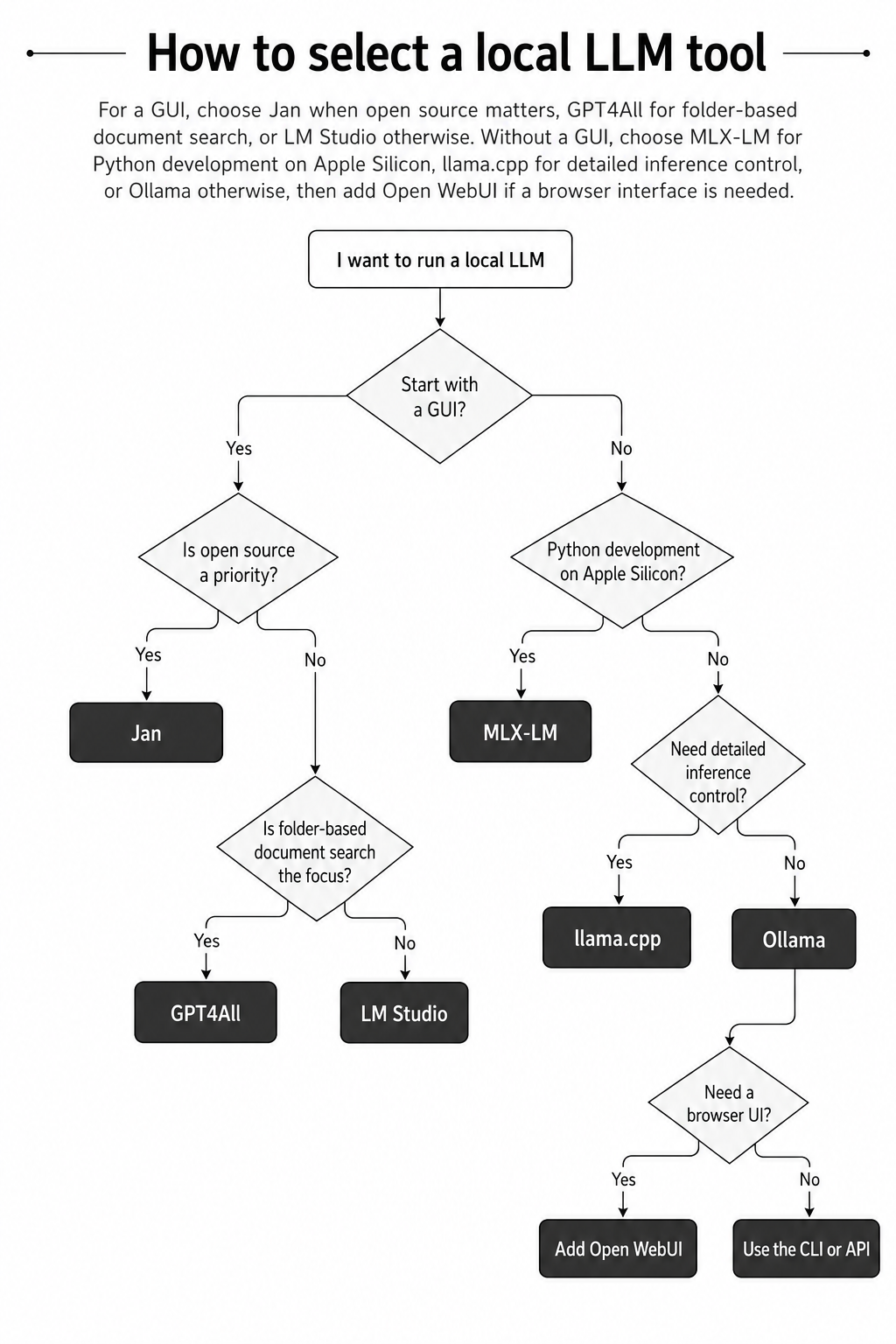
When in doubt, choose LM Studio for a GUI-centric workflow or Ollama for a CLI- and API-centric one. From there, move to Jan for open-source priorities, GPT4All for persistent document folders, llama.cpp for low-level control, or MLX-LM for Python experimentation on Apple Silicon.
Conclusion
Local LLM tools make more sense as layers in a stack than as contestants in one feature matrix.
- Choose LM Studio for a GUI, or Jan when open source is also a priority
- Choose Ollama for CLI- and API-first development
- Choose llama.cpp for detailed GGUF inference control
- Add Open WebUI for browser access, knowledge features, and multiple users
- Choose GPT4All for folder-oriented document search
- Choose MLX-LM for quantization and training workflows in Python on Apple Silicon
- Choose Ollama or LM Studio when Codex integration is a priority
The final answer may be a composition rather than one product. A stack such as Open WebUI plus Ollama separates the user experience from the inference runtime, letting you tailor the environment to your hardware, development workflow, and data-governance requirements.